What's New in LightBurn 2.1
LightBurn 2.1 has arrived! Strap in and don your reading glasses, because this is a big one and we've got a lot to share.
Download Here License expired? Add a year of updates here!
In case you don't make it all the way to the bottom, here are some highlights at the top:
- We've expanded our design and layout feature set with the addition of Quick Nest, Undo History, and the Tangent Circle Generator.
- Cuttle.xyz, a web-based tool for generating personalized designs from templates, is now integrated into LightBurn in our new Web Tools Menu.
- We've expanded camera control to support both network cameras and dual-camera systems, and improved and reworked our calibration and alignment wizards.
- For Galvo users, we now support Split Marking, 16-bit depth map engraving, and EZCad3-based Galvo lasers. Our EZCad3 support is a Labs feature, and still in its initial stages, so be sure to read below for more details on that!
That sounds like a lot — and it is! — but it's still not everything. Keep reading to learn more!
License Expired?
If your license expired before the release of 2.1, visit our website to add another year of updates to your license, and get access to all the latest features.
As a reminder, if you choose not to renew, you will always be able to continue using the most recent version of LightBurn that was released within your license's valid update period.
If you need to download a previous version of LightBurn that was released within your license's update period, visit our release repository.
First Startup Times for M-Series Macs
Users with M-series Macbooks may notice a slower startup time the first time they open the newest version of LightBurn — after the first time, subsequent starts will load at normal speed.
This issue is caused by the translation layer required for Intel-based programs to run on ARM-based Macbooks, and an increase in size for the latest version of LightBurn. We are working on ARM-native builds for future LightBurn releases, which will address this and other pending compatibility issues.
Quick Nest
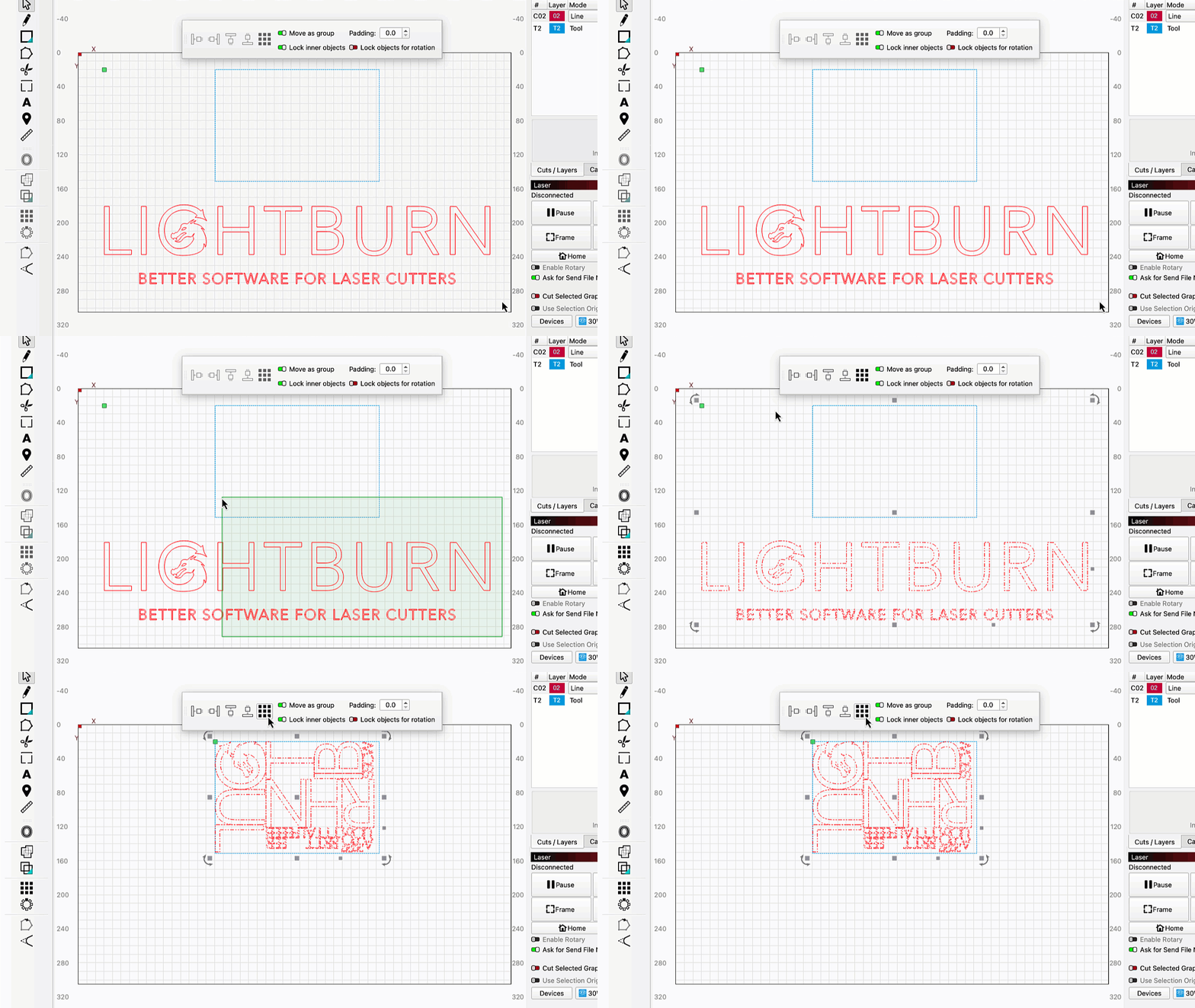
Nesting is a highly in-demand tool for laying out objects within a container shape to maximize spacial utilization — it's great for making sure you get the most out of a sheet of material without having to spend hours manually placing each graphic.
With LightBurn 2.1 we've got a limited version of nesting working — Quick Nest defines each object by the smallest possible rectangle that can fully contain it, then repositions all objects to squeeze them into a container in the most efficient possible layout. While not a full nesting solution, this feature packs a lot of power — more than enough for plenty of use cases. And have we mentioned that it's blazing fast?
You can find Quick Nest by going to Arrange → Quick Nest or in the Docking Toolbar.
Note
We had previously planned to release Quick Nest as a Pro-only feature, but have since decided to make it available to all LightBurn users, both Core and Pro.
Enhanced Camera Support
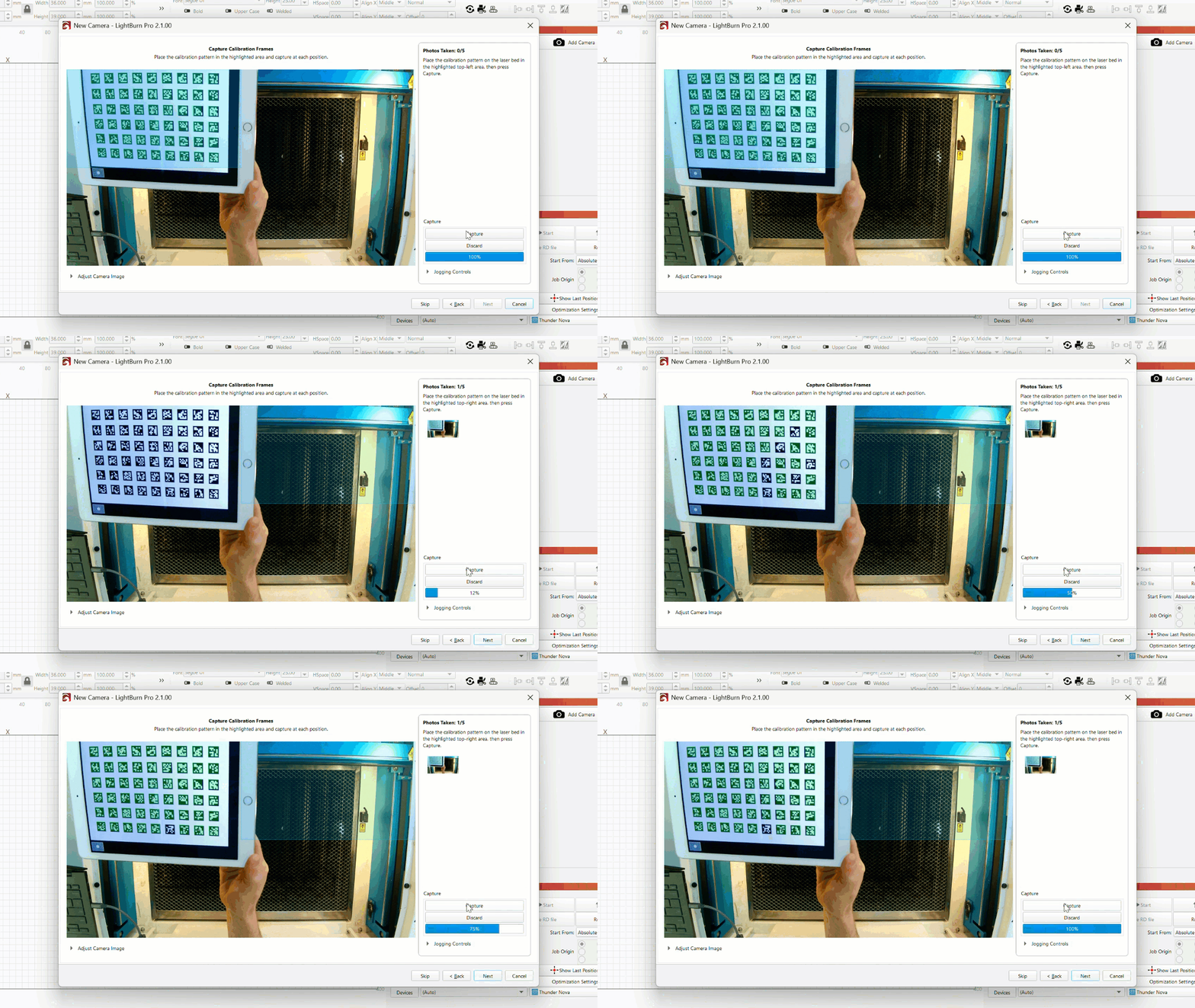
With 2.1, we've overhauled and expanded LightBurn's camera support, including a brand new interface for camera setup and control. Users will be able to add their camera, select from presets, and present feeds from multiple cameras in a decluttered "wall view" UI.
As part of this overhaul, we've added support for network cameras and dual camera systems, greatly expanding the range of machines that work with LightBurn's camera control features.
Cuttle Integration
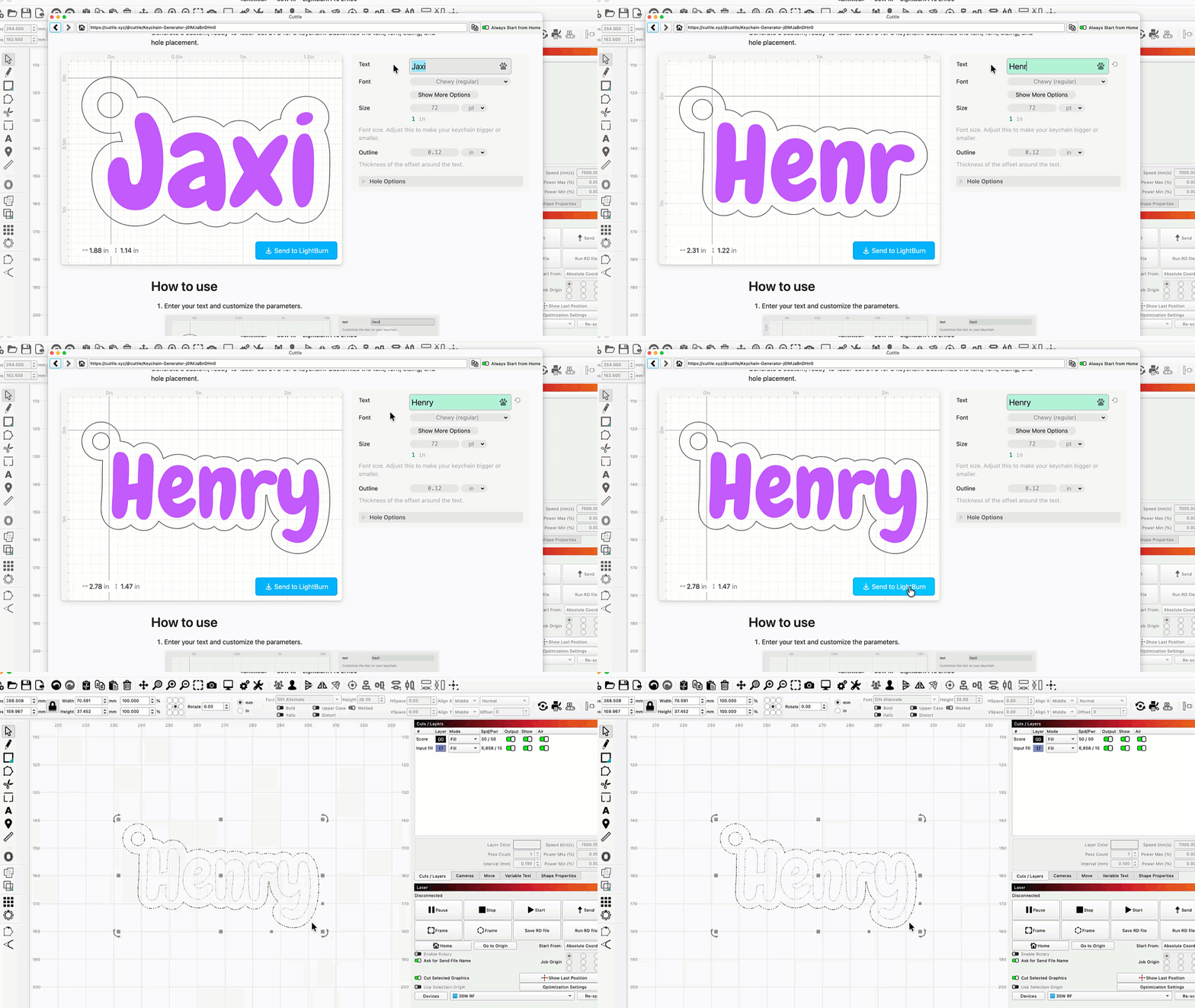
If you've never heard of Cuttle, let us introduce you — it's a powerful web-based tool for generating personalized designs from templates.
In 2.1, we've integrated Cuttle directly into LightBurn. You can choose your design, customize it, then hit Send to LightBurn to immediately open it in your Workspace.
Cuttle is a third-party, subscription-based service, and remains completely separate from LightBurn. In other words, if you choose to subscribe, we don't take a cut — we're just fans of their site and want to provide a smoother workflow for our shared users.
If you have any questions about Cuttle, or encounter any issues while using their services, please reach out to them directly at Support@Cuttle.xyz.
As part of this integration, Cuttle is offering a 7 day free trial to LightBurn users, and they also offer a permanent free tier to all users which provides 10 downloads a month and access to a limited range of templates.
We'll be exploring more of these types of integration down the road, so keep an eye out for new entries in our Web Tools menu going forward.
Undo History Window
We've all been there — working away, editing up a storm, only to realize we regret all our life design choices. Then it's undo to the rescue.
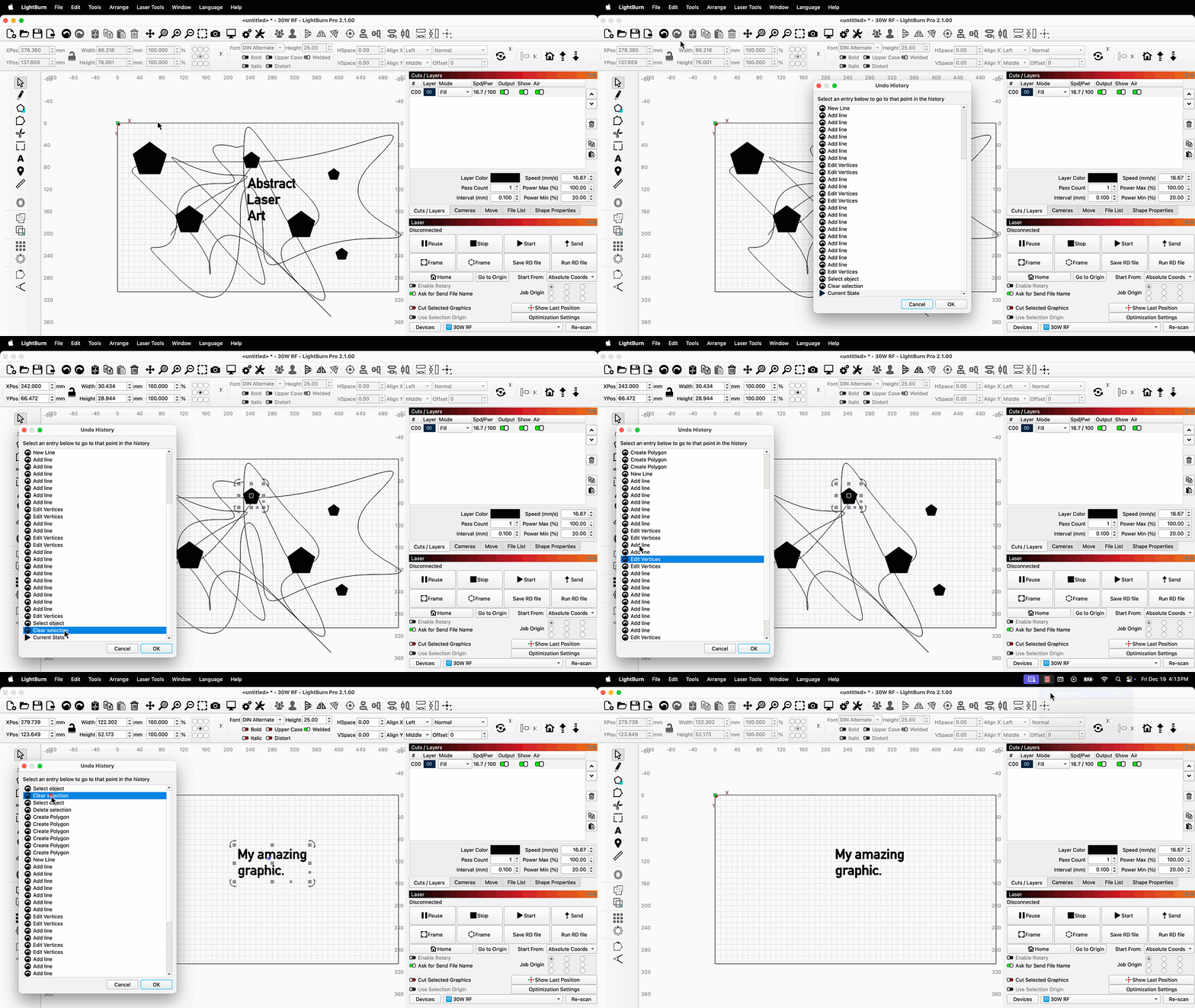
LightBurn's internal undo list has always been unlimited, meaning you can undo any action you've taken, going back to the very start of your session — sometimes that just means hitting Ctrl + Z several dozen times.
Starting in 2.1, you can go to Edit → Undo History and see a selectable list of your past actions. As you cycle through the list, you'll see a preview of your project's state, up to a given action, in your Workspace. After selecting an action, click OK to turn back time and confirm that prior state, undoing everything you've done since.
Tangent Circle Generator
Because our developers really like math, and the rest of us really like making cool designs, we've added a new Tangent Circle Generator.
To use it:
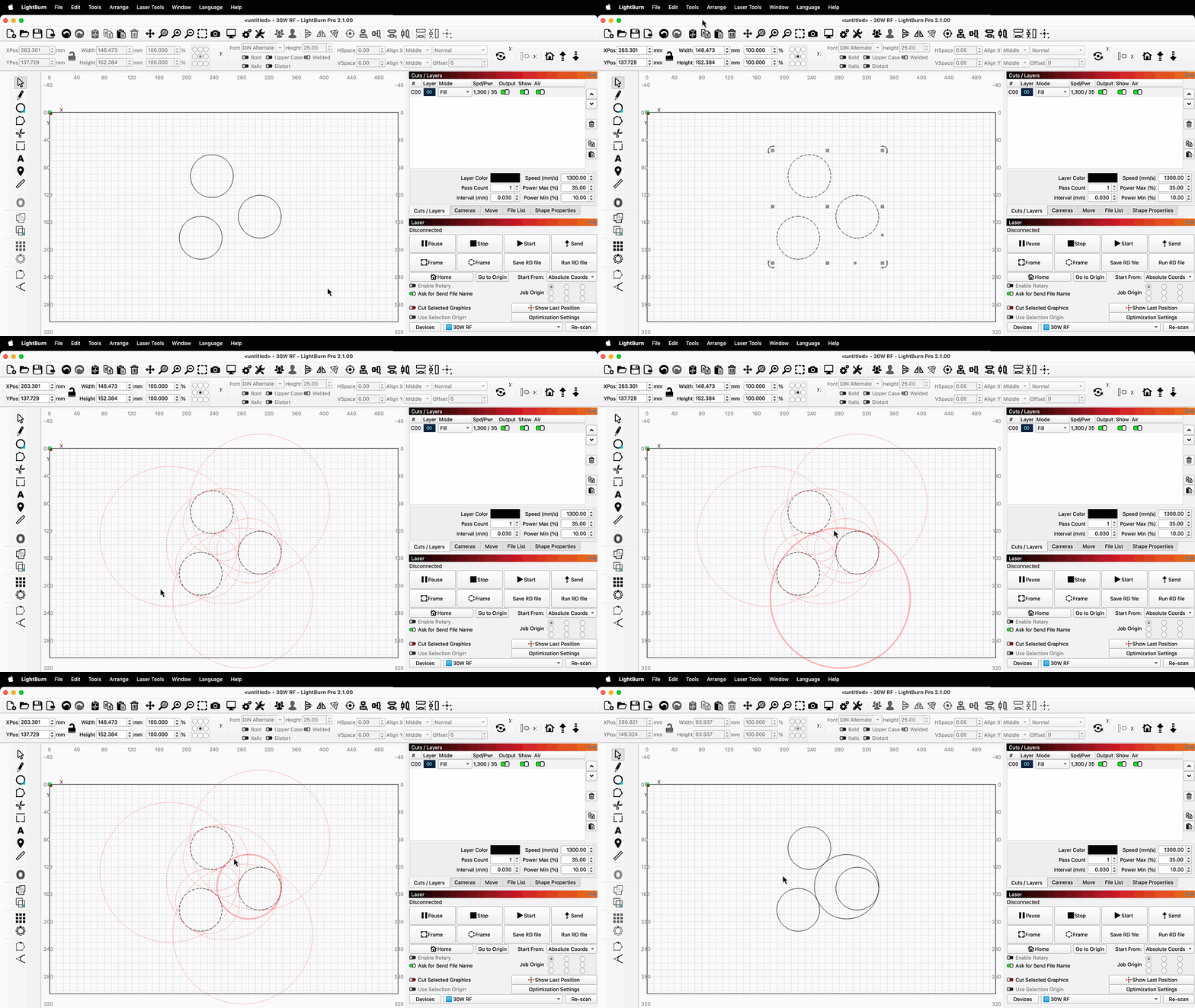
- Select 3 circles in your Workspace.
- Go to Tools → Generate Tangent Circle.
- LightBurn will show you all possible tangent circles in light red outlines. When you hover over an outline it will turn bold, indicating it's ready to be selected.
- Click to select and create that tangent circle in your Workspace.
Split Marking for Galvo Lasers
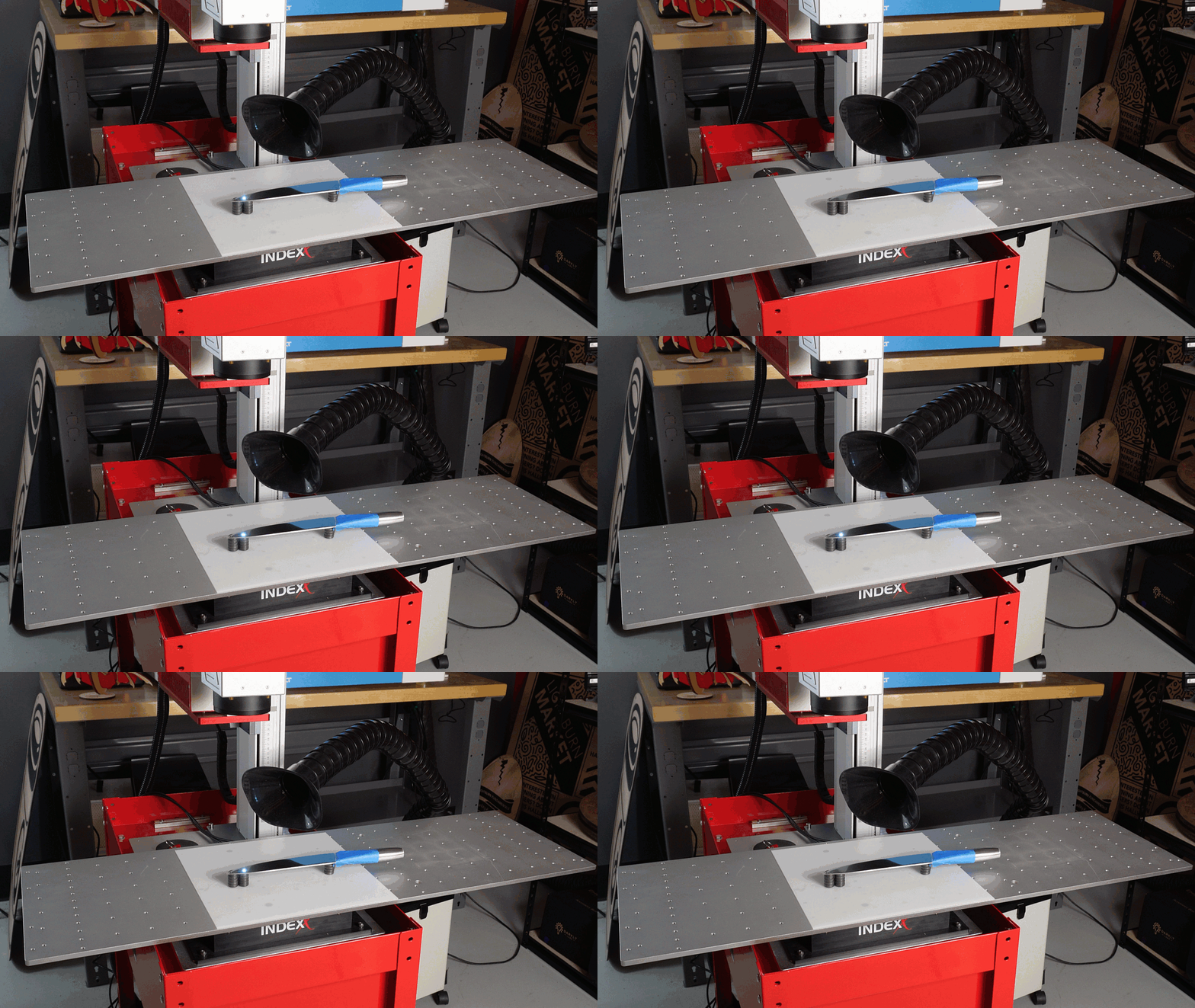
Split Marking allows users with Galvo lasers to mark graphics larger than their laser's work area using a linear or rotating axis.
You can find Split Marking setup in the Modes Toolbar — click the conveyor icon, then enter the necessary parameters for your linear or rotating axis, and toggle on Enable Split Marking. LightBurn will now automatically split up any graphics larger than your laser's work area, and move the external axis the appropriate distance to mark them in full.
Initial EZCad3 Support
This one has been years in the making — LightBurn now supports EZCad3-based Galvo lasers.
Our initial support provides the same level of control that we have for EZCad2-based lasers — all standard marking options, rotary control, and split marking.
We also support Z Axis jogging for EZCad3 based lasers, and we will add support for automatic Z stepping during jobs in a future update.
It's important to note that EZCad3 support is a "Labs" feature in LightBurn 2.1. That means we've done lots of testing in house to make certain it's ready to go public, but we also know it needs a bit more polish before it's complete. Please use with care, and report any unexpected results on our forum or by email.
What Happened to EZCad2 Z Axis Support?
We added initial support for Z control for EZCad2-based Galvo lasers in the first several Release Candidates for version 2.1. After testing, we decided this feature was not yet ready to go live in the full release.
Note that, while we don't make a habit of this, Release Candidate features are always subject to change, including complete removal. EZCad2 Galvo Z Control will return soon™.
16-Bit Depth Map Engraving
LightBurn now supports 16-bit depth map images, allowing users with Galvo lasers to achieve much more precise 3D engravings.
Standard 8-bit depth maps contain information for 256 shades of gray, but 16-bit images contain information for 65,536, allowing LightBurn to slice those finer shades into a greater number of meaningful passes.
For an 8-bit image, anything more than 256 passes will yield greater depth but no greater precision.
With a 16-bit image, well, we really don't recommend going up to the full 65k plus, unless you want to run your laser for a couple days solid — but it's cool to think that you could. You'll still see the difference with more reasonable pass counts in the 500 to 1000 range.
Design and Control Units Split or Linked
With LightBurn 2.0 we made Design and Machine units independent — in other words, you could edit graphics using imperial units, but set your speeds in metric, or vice versa.
That change caught some users off guard, so we've updated the behavior once more. You can now choose to set independent Design and Control units, or link them so that any time you change either unit type, the other changes too. Enabling linking brings back the original behavior from versions of LightBurn prior to 2.0.
As with 2.0, you'll find the option to adjust Design Units in your LightBurn Settings window, and Control units in your Device Settings window. The option to link Design and Control units is available in the Device Settings window.
Vendor Menus
Vendor Menus are new, custom menus that you'll see in LightBurn if you set up your device profile using a bundle provided by your laser's manufacturer. In the menu you'll find links to their website, learning resources, and information to contact their support team.
In addition to enabling Vendor Menus, bundles simplify the set up process. Just drag and drop the bundle into LightBurn, then select the device profiles and Material Libraries you'd like to import.
Cut Planner Speed Improvement
Updates don't just mean new features, they also mean feature improvements — our developers are constantly working to optimize LightBurn's performance.
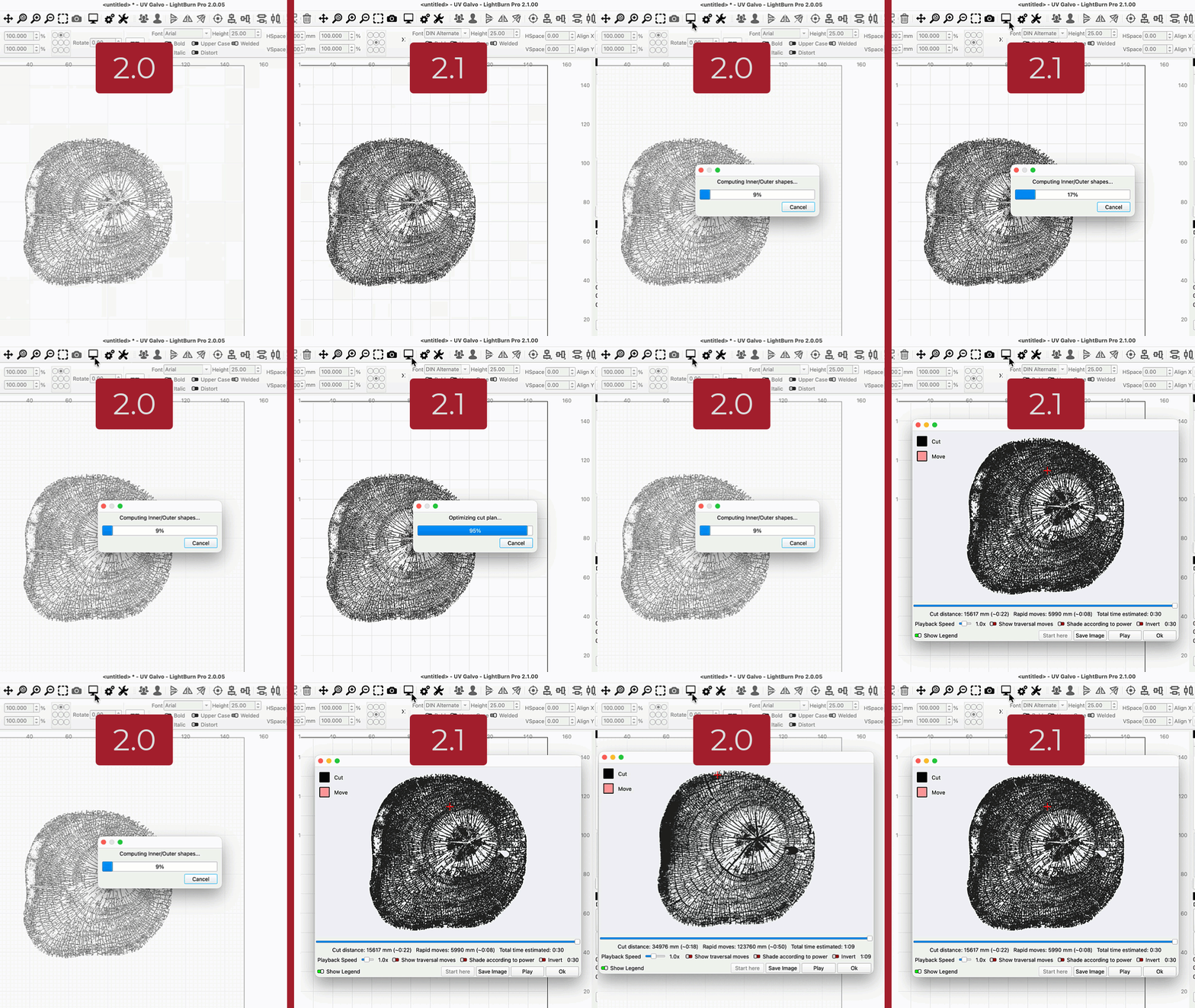
In 2.1, we've made the cut planner much faster. That means when it's time to Preview or Start a complex project, LightBurn will now calculate and send the job in a fraction of the time it used to.
Other Notable Changes
- We've introduced a new Font Manager to improve our existing font filtering system. Right-click in the font list and select Open Font Manager... to see a new window where you can search, filter, favorite, and hide your fonts.
- You can now save LightBurn files in a special Template format. When you re-open a Template file and make changes to it, it will default to saving as a standard .lbrn2 file, so that the original Template is never accidentally overwritten.
- The In/mm toggle in the Numeric Edits Toolbar has been replaced with two radio buttons, in an effort to make the their function more clear.
- A new Select Circles option has been added to the Edit Menu. It does what you'd expect it to based on that name — and more! You can specify a Range or input an Exact Size to select only the circles within your design that fall within your chosen parameters.
Click here to read the full Changelog
LightBurn 2.1 Changelog
New Features
- Multi-Camera Support
- Quick Nest
- Font management dialog
- Undo history dialog
- Project template files
- Tangent circle generator
- New "Web Tools" integrations
- Added custom gcode job header auto generation and editing as a gcode block.
- Custom gcode can now have escaped text sequences.
- Make G20/G21 modals editable gcode blocks for custom gcode.
- Support Dxf Export for AC1009 & AC1021
- Split out Control Units from Device Units
- Added toggle switch to disable KT332N U - Z axis mapping
- Print Line Width is now a user setting in Import/Export
- Direct Raw and Undistorted image capture from all camera types
- Add ability to name lasers sources when dual lasers enabled
- Camera Lens Calibration wizard sample thumbnails and percentage scores
- Vendor Links Menu for Devices imported from Vendor Bundles
- Add support for M73 percent and time remaining estimates for Custom GCode Machines.
- Updating correct Masso gcode defaults after feedback from their support
- Console log improved status query and syntax coloring
- Show Custom GCode Flavor in Device List
- Support for Duet / RepRap GCode Flavor
- Overlay capture uses Warm-up Frames setting when camera previews are paused
- Ezcad2 Galvo Z Control will return in Avengers Doomsday
Existing Feature Updates
- Certain zoom levels were slow because of transparent grid
- Add 'Flash Layer Shapes' action so it can have a hotkey
- Minor Tweaks to Cut Settings height
- Better handling of Enter key in Repeat Marking
- Major improvements to reduce direction changes, choose best direction
- Don't auto-weld single line fonts, only classify SLF-OPF as Single Line
- Added RunLengthDecode support to PDF import
- Allow 'Bake' variable text work on selection
- Give stacked buttons a bit of forced extra width to allow side clicking
- Move "library" buttons under the lib to allow shorter vertical
- Show a message if the user tries to calibrate axis while rotary mode is on (gantry)
- Icons for Material Library functions
- Material test, allow boxes as large as 400mm, limit max font size depending on laser type.
- Keep cuts list position when list changes, keep selection in view when moving up/down
- Forgot to check in new themes for gcode
- Show tool position during cuts using the linecount sent.
- Turned off extra comments that were incorrect for custom gcode
- Increased galvo rotary size limits to 20 meters
- Updated rotary runner screen limits to match setup screen
- Shrink the cut settings window
- Double-click to Adjust Image
- Smaller galvo settings window for Devil's Resolution
- "Remove fillet" preview
- Reduced cut setting window 10 pixels more by reducing the dither preview size
- Mood sensor added. Will generate more bugs when user is angry
- Raised acceleration limits for gantry simulation
- Show warning if using 3DSlice with a single pass
- Drill files with Z drop + Z lift in place will generate 1mm circles
- Export hidden lb/mm layers to svg as hidden entities in SVG
- Regenerate the color swatches when font scale is changed
- Store/restore the repeat mark jog distance
- Galvo framing now gracefully handles when you have too many shapes
- Auto-select laser1 / 2 if appropriate
- Handle 16 bit maps with pre-multiplied alpha
- Add rotary diameter as a custom gcode variable
- Large performance improvement for Operations Mode, and fix to recursive drawing warning.
- New Scissor Tool operation uses shift key to send the clippings to the active layer.
- New optimizer wasn't special casing filled shapes
- Remove the null at the end of Adobe's SVG paste data
- When logging enabled, write SVG content to file
- Write available paste formats to debug log
- Fixed multicameras head-scan going out-of-bounds when the camera offset was too big
- Added Thunder Laser presets to New Camera list
- Automatic TabBuilder fixed to prevent having first and last tabs closer than the minimum requested distance.
- TabWizard fixed to prevent having first and last tabs closer than the minimum requested distance.
- Head-mounted camera scans were not being limited by the DPM settings
- Emblaser shared cameras required some settings to be tweaked
- Modified Emblaser Pro Stop command to suppress duplicate newline
- Added "air protect" setting for Thunder
- Camera Preview Quality is now a global preference
- Fiducial markers modified to not overdraw crosshair line when demicircle is not filled
- Some emblaser commands were missing newlines
- Another missing newline for Emblaser Pro and strip upload terminals
- Modified EPro firmware upload to wait for completion rather than depend on timer
- When using 'Negative' with 3D slice, reverse the slice order
- Force "Flood Fill" to fill shapes individually, to enforce order
- Redirect main toolbar 'Update background' action to multicameras
- Network camera download limits & faster shutdown
- New Camera wizard improvements and modified camera prefs
- Added a checkbox to job control to Ask for Send Name so it can be disabled.
- Improved Add New Camera URL entry UX
- Accept PNG images for HTTP camera sources
- Changed Connection type 'Ethernet' to be 'Ethernet or Wifi' for clarity
- Show rotary icon on the Start button if active
- Update Overlay could crash during homing if changing device from a bigger machine
- Camera wizards UX pass
- Renamed "Undistorted" Camera Image capture menu action to "Calibrated"
- Camera alignment wizard manual process had old extra step when going back
- Rare multicamera async crash when changing device
- Fixed HTTP camera bug that was corrupting some mjpeg streams
- Memory leaks in New Camera Wizard
- HTTP camera compatibility improvements
- Scissor Tool with shift-click should move entire shape to current layer just like trimming a section does.
- Limit outgoing TCP queue size to 8K
- Fix Emblaser Pro file upload progress
- New Camera presets updated
- Clear ToolState on device disconnect
- Changed text in 2 places to License Management to be consistent
- Fix multicameras head-mounted alignment when using manual 'circles' alignment target.
- Position query was interfering with emblaser GetFileContents
- Device-level LastCamera prefs needed to remain
- New camera wizard was not setting reconnection properties correctly
- Improved compatibility for Thunder Vision camera streams
- Sub-layer remove/hide logic improvements
- Increase printer line width resolution to three decimal places
- Better framing for 9-pt correction mode
- New Community Page link added to Vendor Bundles Info & Menu
- Automatic display setting adjustment updated to find best UI Font and Toolbar Icon size for the screen instead of forcing smallest sizes.
- Updated BSL libraries
- Added external motor current settings
- Remove hard-coded Emblaser Pro exhaust fan commands from job start/end
- Support for 2 motors for rotary, Z, etc
- Increased max galvo speed to 40k mm/sec
- Hide max and min power for galvo instead of just disabling.
- Laser & Cuts/Layers windows smaller
- 9-point calibration framing improvements
- Made 'Units' toggle clearer
- Expanded MarkCfg0 parameter parsing with approximately 30 new fields
- Removed Tilted Model terms from Extended Camera Calibrations
- Allow for extra ok's from buggy WeCreat firmware
- Coordinate clamp is now calculated from field size instead of hardcoded
- Laser source error status is now displayed in the laser controls panel.
- Increased Z jog distance maximum from 500mm to 1000mm
- Select when pasting from other apps
- Allow read/write of laser 2 offsets for Ruida
- Changes for hydra/GT5 Ruida
- Update machine settings for new Ruida laser configs
- Allow support height for Custom GCode
- Save & restore Undo History position & size
User Interface Updates
- Fixed vertical spacing and minimum height for tabs for the galvo cutsettings dialog
- Set the Radius tool to have 2 decimal places when in mm units.
- In the layers form, Spd_Pwr column, show the Power to 1 decimal (if value is under 100 so user will see the fractional power setting they expect)
- Change Radius to show 2 decimals in mm units. Changed the min max Radius mm to equal the converted inches so conversion back and forth at the maximum is consistent.
- Dramatically improved quality of UI when High DPI scaling is enabled.
- Fix the AirAssist and Marlin Laser Commands groups boxes getting squished when form is reduced vertically.
- Selected shape / item dash length now scaled for screen dpi.
- Better message for PDF Import Error to suggest converting to image before import.
- Improvement to probe wizard to deal with zero Tool Diameter better.
- New icons for diamond scribe
- Added shortcut for device manager Alt+Shift+M
- Hide other bundle controls when editing vendor info
- Applied correct DPI scale to message box icons when display scale is above 100%.
- Updated MessageBox icon set.
- Prevent app title bar from appearing off screen when stored window position offsets are incorrect.
- Added higher resolution images for unidirectional and offset fill types.
- Console colors are now set from the application theme.
- Added "Workspace DPI Scaling" display setting. This allows higher resolution drawing / previews to be switched off to improve line visibility on very high resolution display (eg. Apple Retina), or to improve performance on low powered devices.
- Changed console and custom GCode settings font from "Courier" to "Consolas" if available on Windows devices.
- Added startup checks for common issues that cause ui elements to grow too large for the screen.
- Added prompt to automatically restart when settings are changed that require an application restart to apply.
- Macro Edit text input now correctly strips formatting from pasted text.
- Fixed Focus Light tooltip for BSL Fiber
- New Warning icon added with better contrast at smaller sizes.
- Renamed Reverse Z checkbox to Invert Z Galvo to clarify it controls galvo coordinate direction
- Created outlined labs icon with white border for visibility on dark device logos
Bug Fixes
- Prevent extreme fisheye projection infinities from crashing the diagram in the head mounted camera wizard
- Handle cancel of Offset Fill
- Galvo auto-rotate scan angle was not being reset between jobs
- Invalid custom gcode blocks were getting hidden
- Tabs not created properly on spiral cut when wraptab necessary
- When framing first, job was continuing if canceled after out of bounds warning
- Large images might not load with Qt6 build
- Restore geometry after previously zeroed values
- Better handle device units for people upgrading from older versions
- Enable relative arrow-jogs with ruida
- Increase epsilon distance on Trim checks
- Fixed a rare crash caused by a perfect storm of geometry, timing, and user confidence
- If an image fails to import, show an error message about file size (if greater than 100MB) or possible corruption.
- If a very large image fails to import, show an error message about file size or corruption.
- Adding origin type to Go to Origin
- Node editing was not undoing properly because the selected node got removed from the undo.
- Fixing the fire power setting when the Fire button is already enabled.
- 3D slice masked / transparent pixels shouldn't be negated
- Proper handling of click-drag of multiple nodes
- Fixed Windows DPI scaling bug that could increase the size of UI elements to a degree that made application unusable.
- Fixes a few laser-specific jog issues.
- Rotary enable icon was not showing correctly in some cases
- 3DSlice resampler crash caused by temp variable going out of scope early
- Fix file 'Start' corruption after using Send
- Switching user start script and header positions for custom gcode.
- Fixed DPI scaling issue causing blurry / pixelated setting switches and list item icons when display scale is above 100%.
- Properly parse firmware hold state for GRBL-like firmwares if triggered by the machine.
- Changed single line font prefix to SLF, instead of SLF-
- Intersection snaps fixed
- BSL 'Done Marking' signal wasn't emitted
- Ruida ignored focus command if Z-speed wasn't set
- Extend Docking outside workspace, to fix rounding error bugs
- Relax distance requirements on Docking
- Do not allow user to toggle laser FIRE while framing or busy.
- Fixed comparison calculations causing CutShapes to leave bits behind.
- Empty shape could crash gcode generation
- Bundle Import from device window was broken
- Head mounted camera wizard AprilTag pattern was not working if device units were imperial
- Use error dialog in case of error reading controller info, use warning icon otherwise.
- Removing discrete jogging clamping, fixing continuous jog for G54-configured machines.
- Fix synchronous-mode timing regression.
- MacOS rate limit for Ruida, + variable packet size limit
- Forcefully truncating float numeric error for position down to 1 micron.
- Fail gracefully on DXF SPLINE objects with fit points
- Adding a parsing in the connection info to check for G54 offsets with a warning dialog.
- SVG 's' command didn't work for sequences of points
- Fixed bug causing bottom of main window to appear off screen on load.
- Fixed incorrect maximum size limit on MacOS toolbar buttons.
- Fixed issue with toolbar icons having edges cut off.
- Fixed issue that could cause main window to load on incorrect screen, sometimes many times larger than the screen.
- Prevent top level menu keys from conflicting with hotkeys.
- Updating displayed position to 0,0 after homing on Ruida.
- MacOS could hang or crash when framing
- Font skips around and reverts on Mac
- Qt6 set a 256mb max image size. No thank you.
- When pasting a copy of a PathShape, do not create Tabs unless the source cut had Tabs enabled.
- Fixed issue with docks resetting to default layout every time app is started.
- Fixed issue causing docks to consume entire window if operating system display scale is changed.
- Ellipse tool ovals are not exporting properly to DXF
- Stop button didn't properly reset spindle/laser state to off.
- Updating the logic & text of the device size mismatch warning.
- BSL libraries don't apply lens correction to jump moves
- PDF - Crash - Pack Tokens
- Allow zero spindle speed operations with new Tool Type of Scribe.
- Kerf was not behaving like before, and not correct re inner and outer direction.
- Icon theme is sourced from correct path for pre release builds.
- Fixing the parsing for metric or imperial modal checks.
- Prevent text shapes from commit when only whitespace
- Prevent crash when trying to load a malformed text backup path
- Prevent MaxOS keyboard bug, paste into new folder dialog incorrectly causes the text to paste into the current project.
- Updated BSL library for MacOS
- Fix the escape sequence logic flaw for custom gcode.
- XTool device position query was broken
- Fixed reversal of RTL text when applying bend.
- Tested with SHX font, fixed mistake in last checkin.
- For Marlin Devices, force the FeedRate to be sent for G1 whenever the mode changes to G1.
- Inverted SHX Fonts in FontManager
- Replacing the broken truncate function for negative numbers.
- Material library combo box was too wide
- Emblaser WiFi wizard dark mode issues on Windows due to Aero theme
- Deform on an image could glitch on parallel lines
- Fixing rotary CCW jog switching directions
- Importing SVG with ungrouped DEF shapes could crash
- Double-click to launch if unconfigured would crash
- Device units could sometimes get corrupted for galvo devices
- When switching devices using the device combo box, if the CutOrigin has been saved for a device then use that setting instead of the UI prefs setting.
- Significantly reduced risk of death
- Fixed some missing cases for scissor tool, Bézier curve at nodes, and line segments that are not terminations.
- Fixed issue with device settings incorrectly sizing custom gcode options tab contents.
- Fixed Bezier Cubic Root function missing a case that caused scissor cut to fail.
- Art library crashed if files dropped when no library selected
- Auto-join could crash in extremely rare cases from a float rounding issue
- Tab drawing wasn't saving/restoring drawing color
- Prevent a null pointer crash when closing the program.
- Fixed recursive draw error. Show Progress dialog when switching to Ops Mode.
- When choosing different units in settings dialog, convert the arrow move distances immediately to show the converted values, and ensure the range limit works in each control.
- Fix ScissorTool bug that caused duplications during cuts and crashes during undo
- Undo History displayed backwards
- Invalid DXF color indices could crash on import
- Rotary slices weren't always merged correctly with Run Whole Shapes
- Set Zero on BSL could hang the hardware
- Trim would fail if snipping a shape scaled to zero in X or Y
- Windows camera driver could get stuck (wouldn't reconnect properly) if there were USB connection problems
- Prevent thread contention of JCZ command buffers
- Fixed issue causing toolbar icons to double in size when a dialog is on a different screen to the main window.
- Fixed bug that can occasionally set all console text to the color red.
- Svg import can now handle tspan elements with arrays of xy coordinates.
- OffsetFill was ignoring PWM override
- Optimizations couldn't be completely disabled
- Fonts jump in Listview
- Fixed variable text was not restoring the last settings when loading a project.
- Custom Gcode syntax highlighter was stripping out special characters and hex codes.
- Fixed Custom escape character causing string corruption.
- Emit laser2 freq setting
- Quick Nest acting up if Device Origin is top left.
- Fixed fatal crash when applying a radius to a line segment.
- Catch illegal memory access to prevent crash, and show properties correctly for multi shape.
- Overscan distance value wasn't updating in image mode
- Fixed issue with some numeric input boxes not displaying unit values when units are set to metric.
- Fixing punctuation in dialog messages.
- Fixed the Tab wizard when using tab count, building one less tab than expected.
- Fix for incorrect WeCreate disconnect message
- Fixing the G54 offset warning not being shown.
- Fixing the Marlin-related crash on "Go To Origin" button generating "G53G1" without a space.
- Fixing the need to turn off and on again the Show All toggle in the Console for gcode if a connection is reset or device changed.
- Don't show overrides panel during jogging
- Nested bitmaps could cause infinite loop when merged
- Font Dropdown Box displays "Favorites" as a selected font
- Camera alignment pattern designer not properly converting zone size to/from Imperial units
- Quick Nest - Support for Text and Group objects
- Quick Nest - Not respecting move as group and lock inner objects
- Font + Paths grouped scaling Bug
- Fix program stall on update for FilletTool
- Unsaved changes indictor in window title fixed for change of device.
- Jog distance and speed were not being restored properly on program start due to unintended events.
- Tool layers weren't collected if framing something too complex
- When undoing a deleted layer (or undo delete last shape in a layer) ensure the layer returns to original priority (order) in the layer list.
- Scanning Offset units were entered as Control Units but shown as Device Units
- Laser 1 and 2 are exclusive on GCode. Don't show 2 laser power boxes
- Click to remove fillet didn't always work
- X/YPos values with apostrophe not recognised
- Fixing the move toggle off not preventing unselected shapes from being dragged in the workspace.
- Fixed theme bug that would cause the settings dialog to think a restart is required if the app theme is set to "System Theme" even if no settings have been changed.
- Very old camera settings files (from before 1.6) could crash on import
- SVG Import crashes when use references another use in defs
- Uninitialized "insert" state caused a crash
- Fixed issue causing layer palette icons to be larger than the tool buttons with certain combinations of ToolButton and Font Size.
- Fixed issue with minimum font size setting increasing some UI font sizes when High DPI Scaling is enabled.
- Fixed issue causing incorrect icon showing for selected layer in Cut Settings dialog layer list.
- Trying to increase flexibility of Custom Gcode for non-standard GRBL firmwares.
- Allow unlimited custom gcode alarm or error codes with buttons to add more rows when needed.
- Job complete sound plays for BSL when using rotary or repeat marking
- No job complete sound on BSL rotary
- LicenseExpiringSoonDialog changed 'will expire soon' to 'expires today' on last day.
- Bundle Export section titles were English-only and not being translated.
- Galvo Z accel was stored / retrieved wrong
- Repeat Marking, show proper Increment units to match axis type, added tooltips to the Test button.
- AutoGroup was failing with trivial type of shapes like Rectangles.
- AutoGroup was failing with trivial type of shapes.
- Radius Tool Needs 4 decimals when using inches to behave like LB 1.7.08
- Update License 'expiring soon' text to 'expires today' on final day.
- New Camera Presets for Thunder Vision network cameras had ports swapped
- BSL crash on USB pull
- Added missing blank icons to main window menus
- Max Power label was disabled
- Parse console lines for instant commands that shouldn't end with a newline.
- Fixed MacOS Hotkey modifiers for Rotation of Selection not working for 1.5 degrees (Ctrl+Shift+ , or .)
- Fixed MacOS Hotkey modifiers for Rotation of Selection to use the Ctrl key instead of the Command key.
- Shape Rotation for 1.5 degrees using Ctrl+shift+ , or . fixed.
- GCode Real-Time Commands now send without newlines for compatible protocols
- Custom GCode Marlin flavor preset had "?" GetStatus but should be "M114"
- Show Q Value instead of Power% for Galvo Devices in the Cuts list
- Clean up Start Pt arrow rendering
- Prevent infinite loop trying to build tabs in a shape that is too small.
- Only show Q-pulse instead of power for UV galvos
- Control units were not defaulting to reasonable metric value
- Custom GCode was not properly using rotary mode
- Fixed crash by using a lowercase @p or @t in a pause message.
- File path used by Operations Export Wizard not sanitized in Bundles
- Support extended real-time commands for GRBL and grblHAL
- Send real-time console commands even when busy
- Combine repetitions of real-time commands in console log
- Shape properties would not populate correctly when switching between certain shape types directly.
- Operations Library view was not being refreshed by units change
- Fixed protocol type checks using DisplayName instead of protocol identifier
- Fixed laser PWM count clock threshold (was comparing kHz value against 1000000 instead of 1000)
- Fixed scan delay calculation missing LaserOff time component
- Fixed COR file header offset causing incorrect field parsing
- BSL fiber Z homing was using ZMotorIndex instead of ZAccelTime for acceleration
- Prevent "Missing GCode For selected settings" warning in Device Settings dialog when inherited placeholder is valid
- Add space after emitting G53
- Handle malformed xml data better and report more issues without crashing when loading a damaged or incorrect file.
- Some escaped characters were causing strings to visually repeat in the console log
- New Device Wizard should reset Dwell when a new Flavor is chosen
- GRBL M3 Flavor jog panel got broken when switching from another Flavor that had continuous jog
- FluidNC support was missing some connections
- Updated GRBL-STM GCode Flavor to enable continuous jog and probing
- SVG with OffsetFill didn't export correctly
- Fixed some galvo framing issues
- Zero Axis buttons were incorrectly greyed out for some protocol flavors
- Deform tool issues with grouped base shapes
- Fixed all-zero command blocks sent when listSize is a multiple of 256
- Fixed coordinate scaling - wire coordinates are mm, board uses kxy to convert to DAC counts
- Fixed correction table memcpy only copying half the data
- Fixed corFieldSize not being set when importing .cor file during device setup
- Added missing scanner type 1 to protocol switch for prot=0x3FFF
- Custom gcode rotary diameter setting was never emitted
- Crash on closing Devices window with Emblaser device active
- Don't escape tab characters in the console log
- Laser source errors no longer disconnect - errors during marking cleanly stop the job, errors during idle block new marking jobs but allow framing.
- Some new camera UI fixes
- Custom GCode was double-scaling imperial position queries when $13=1
- Ungrouping an array with mirrored objects looses the mirror transform
- Un-grouping native shapes after mirror transform caused flip
- Removing tiny prims could cause open shapes
- Grayscale preview showed black until the power changed
- Several fixes to get the latest camera upgrades in a reliable state for Lightburn 2.1 release
- Custom GCode
CanZeroAxiswas not always returning a value for less used flavors - Unprintable escaped characters in Custom GCode example blocks were appending odd HTML characters
- Fixed crash in Find My Laser when e-stop is engaged. WaitForCompletion and TerminateExecution now check doQuit for graceful thread shutdown.
- Fixed device discovery polling sleeping 20 seconds instead of 20 milliseconds in ConnectJCZDevice, ConnectEZC3Device, and ConnectBSLDevice.
- Head Cameras "Single Capture" was not returning to scan height
- Save Background Capture was flipped
- Resolved ALL ongoing legal issues from the 6th incident.
- Rename Falcon A1 to Falcon A1 Pro
- Split line and fill settings into tabs
- Setting selected_camera_type properly now
- Defer abs coords warning on alignment widget to first next press
- Clamping the tool's movement to be within the workspace.
- Fixed typos in Quick Nest messages
- Elevated Incorrect Alignment Calibration to Error
- Circle-check-solid.svg - circle-check-solid.png for proper pixmap on mac
- Fixed potential memory leak when validating custom gcode settings.
Miscellaneous
- Update Darkly Labs links and logo
- Add ZhiYuan wrapper for Ruida-compliant UDP protocol
- Update Mach and UCCNC gcode profiles
- As always, if something looks wrong in Preview, believe Preview. It has seen things
- Add Skip this Version option for updates
- Allow overriding of G54 with other coordinate system in Custom GCode
- Added "flibertigibiting" as a new laser mode for the vibe coders to feel comfortable
- Tweak code for fetching buy license URLs