Camera Installation & Focusing
If your laser didn't come with a camera and you're installing one yourself, you'll need to make sure you mount it correctly. If you don't have a camera yet, see Camera Selection for help.
The best place to mount an overhead camera is directly above the center of the bed of the laser, with the bed completely visible. The best way to do this is usually to mount the camera on the inside of the lid, so the placement is correct when the lid is open.

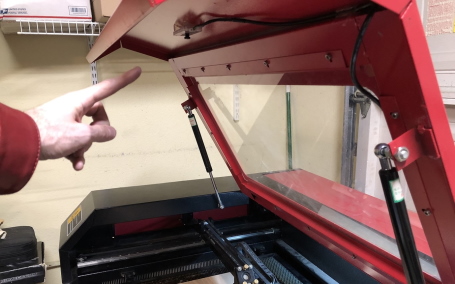
Mounting tips:
- The camera should be focused as well as possible. Most LightBurn cameras are manually focused by gently twisting the lens.
- The camera must be solidly mounted to be in exactly the same position when using it as it was when you performed the alignment process. If you mount it to the lid of your laser, make sure the lid opens to the same place every time. You can use a cord or rod to ensure the lid is always at the same position when opened.
- If your camera is in a mount, make sure it doesn't move within the mount. A small piece of EVA foam or even tissue can hold the camera securely in the mount.
- Mount your camera so it isn't in the path of the laser head, and run the cable so it is not in the path of the beam. Ramming the laser head into your shiny new camera is a great way to increase your blood pressure.
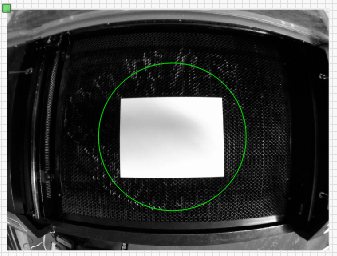
- Focus the camera so as much of the bed is in focus as possible. Some cameras, like the 5mp-60, have a narrow focus depth, and if mounted high, can be tricky to focus. If this happens, focus on a circle that is roughly halfway from the center of the bed to the edge of the image, like this:
Info
USB Cameras should plug in to your computer as directly as possible, without using an excessively long cable. USB 2.0 cables have a maximum length of 16 feet (5 meters). If you absolutely must use a longer cable, a powered USB 2.0 amplifier may help extend the distance, but is not guaranteed.
If USB cable length limitations are a problem, consider the possibility using a network camera, which requires LightBurn 2.1 or newer.
Info
To use LightBurn's camera functionality, you must use Absolute Coords mode, so LightBurn can accurately position the work. If you use an older Trocen controller, they do not allow setting this mode from software, so you must change the working mode through the controller menu.